
Microsoft Copilot vs. ChatGPT: What's the Difference and Which Should You Use?
AI has officially moved from buzzword to everyday work tool. But not all AI is built to help you in the same way. Take two popular engines, Microsoft Copilot (which has been getting some functional backlash lately) and ChatGPT (which is probably the most well known, but also the least secure). The major difference between Microsoft Copilot is woven into apps you already use, while ChatGPT lives in the browser as flexible chatbot with some integrations as well. But which one actually helps you get more done in your day-to-day role? It depends on your intent and needed outcome.
In this article, we’ll break down Copilot vs. ChatGPT in plain language, share real examples of how end users are using each tool at work, and help you decide when to use which so you can work faster, smarter, and more securely. Let's dig in.
Featured in this article:
- What's the Difference Between Microsoft Copilot and ChatGPT?
- Pros and Cons of Microsoft Copilot
- Visual Breakdown of the Differences Between Copilot and ChatGPT
- Pros and Cons of ChatGPT
- Other Helpful Links and AI Readiness Resources
What's the difference between Microsoft Copilot and ChatGPT?
While both engines run on similar technology (OpenAI's GPT platforms), the two tools were built for difference purposes, meaning users will get the most out of each engine when they're using them in the way they were intended.
Microsoft Copilot is optimized for Microsoft 365 and built to integrate with apps like Outlook, Word, Excel, and Teams. It securely uses organizational data through Microsoft Graph, ensuring compliance, privacy, and copyright protection. Copilot excels at productivity tasks like summarizing Outlook emails, generating reports from your own data, and analyzing that data all while maintaining enterprise-grade security across your systems.
ChatGPT, on the other hand, is a standalone engine built as a general-purpose conversational AI from OpenAI that relies on user-provided context. It was born to excel at tasks like brainstorming, coding help, and answering complex questions. However it is not inherently tied to enterprise systems.
What are the Pros and Cons of Copilot?
NOTE: All Copilot suggestions are built on the licensed version of Microsoft 365 Copilot Business or above. We never recommend businesses to use their company data in any free artificial intelligence engine.
When to Use Microsoft Copilot
- When You're a Microsoft User.
Copilot integrates innately with Microsoft 365 apps like Outlook, Word, Excel, and Teams, enabling you to draft emails, summarize documents, and analyze data within you own workflow. Your output from Microsoft Copilot will be tailored to your unique needs because it's built on your unique data. - When You're Using Company Data to Execute a Business Task.
Since Copilot accesses business information from the Microsoft Graph, you can execute business tasks easily based on company data only.
REAL LIFE USE CASE: Perhaps you're a Project Manager and need to prepare for a critical client meeting, you can use Copilot to summarize key project milestones from the last three months, identify budget overruns from the latest finance report, and extract action items from recent internal meeting notes. - When Your Role Prioritizes Security.
Copilot for work provides enterprise-grade security, ensuring that sensitive organizational data remains protected and is not used to train AI models. People in the legal or healthcare industries deal with sensitive information, which, while AI is for everybody, being safe with how you're using AI is a priority.
Pricing and Tiers
We have a deeper dive into this cost breakdown and the features included here!
- Free Tier. Copilot Chat is free with Microsoft 365 subscription or via web/Bing/Edge, offering basic AI chat grounded in web data.
- Individual Plans. These plans are tailored towards individuals or families who want to get access to a secure AI platform at home. These plans are not designed for small businesses, and the max contributors to the family plan are 6 users.
- Business and Enterprise Tier. These are separated into two categories: small and mid-sized companies (less than 300 users) or enterprise, with varying costs for both. As of December, SMB pricing for less than 300 users was discounted to $21 per user per month (or as low as $18) while enterprise levels are at $30 per user per month.
Key Limitations of Copilot
- Limited Flexibility Outside the Microsoft Ecosystem. Copilot’s power is limited to Microsoft apps; it doesn’t work with Google Docs, macOS tools, or other non-Microsoft environments, unlike ChatGPT’s platform-agnostic design.
- Forced Integration. Users report that Copilot is often enabled by default as part of system upgrades or plans, sometimes with no easy opt-out, provoking strong reactions like “no one asked for this”.
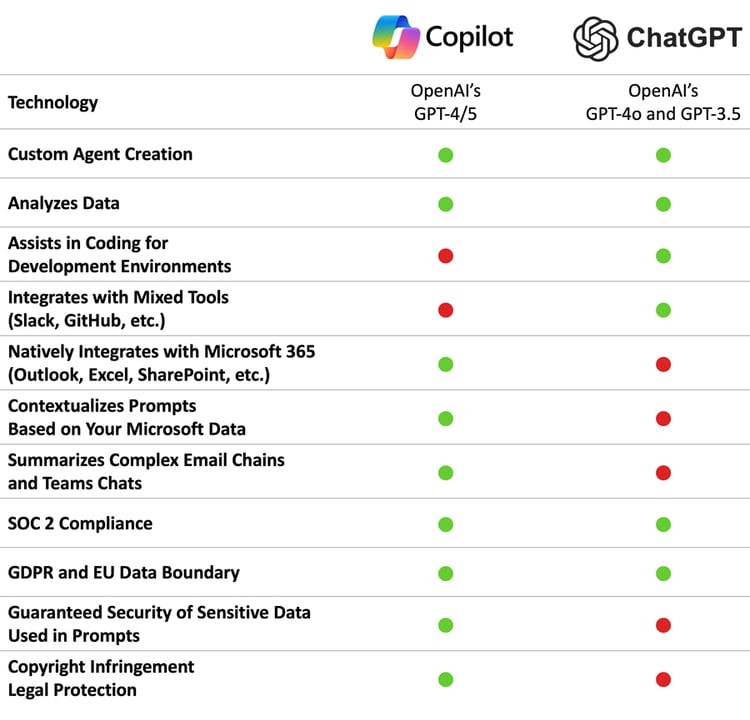
What are the Pros and Cons of ChatGPT?
When to Use ChatGPT
- When You're A Non-Microsoft User, or Executing a Non-Business Task.
ChatGPT is a standalone generative AI that is not innately built to integrate with any specific interface. However, ChatGPT integrates with a versatile list of everyday business applications.
REAL LIFE USE CASE: Perhaps you're trying to come up with a new pitch for a Sales meeting or need a few ideas on how to to make a current product more innovative, ChatGPT will provide you with highly creative, distinct content outside the scope of existing internal documents. - When You Need Ideas, Images, or Help with Problem-Solving.
ChatGPT excels at creative problem-solving and content generation, including creative writing, long-form content creation, and nuanced conversations with emotional depth. - When You Need Help With Coding.
ChatGPT performs complex coding tasks, such as debugging, architecture planning, and generating clean, efficient code. This engine also excels at understanding why an algorithm is failing in a specific edge case and provides detailed explanations and correct implementation logic.
Pricing and Tiers
- Free Tier. You'll have access to GPT‑4o mini and limited GPT‑5 usage with daily message caps (Copilot is built on the GPT-5 model), basic web browsing, file uploads, and image generation.
- ChatGPT Plus. For $20 a month, you'll have a single user access to GPT‑5 (and GPT‑4o), faster response times, higher usage limits, and access to advanced features like image creation (DALL·E 3), Advanced Data Analysis, voice/video chat, and custom GPTs.
- ChatGPT Pro. Designed for power users such as researchers, engineers, and developers, Pro provides unlimited access to all models including GPT‑5 Pro and o1 series, expanded context windows, compute resources, advanced tools, and extended feature limits. This tier is $200 a month for one user.
- ChatGPT Business (Team). This tier switches to an annually billed cost of $25-$30 per user per month that includes Plus-level capabilities combined with secure collaborative workspace, admin controls, shared projects, compliance support, integration with enterprise tools, and no training on business data by default.
- NOTE: this is the first tier where security measures are mentioned as a part of your plan.
- ChatGPT Enterprise. The Enterprise tier includes all of the Business features plus enterprise-grade security, large context windows (up to 2M tokens), SLAs, dedicated support, advanced compliance, API integration, and custom data retention policies.
Key Limitations of ChatGPT
- "Hallucinations" and Inaccuracy. ChatGPT often generates false or fabricated information (“hallucinates”), such as misleading citations or confidently stated errors.
REAL LIFE EXAMPLE: One study found over 56% of its mental-health references were fake or inaccurate. These inaccuracies can pose serious risks, especially when used for research, medical, or legal advice. - Weak Enterprise Security. ChatGPT lacks integration with enterprise environments, as well as compliance and data governance issues (not above that it's isn't until the "Business" plan that security is mentioned. This makes ChatGPT less suitable for secure, workflow-embedded business use. It's only a matter of time before there are companies just combing through public ChatGPT data for the sole purpose of suing the employer for breach of contracts.
Contact us for more information
We're a Microsoft company. We tout the Microsoft solution stack. But at the end of the day, we understand that Microsoft doesn't have the corner on the AI market. Either way, we want you to be informed on how to use AI safely and with the right intentions for getting the best our of each engine you choose to use.
That said, if you're curious about AI or simply want to learn more about how Copilot (and it's recent price reductions) can help your business succeed in the future, reach out to us. We want to make sure you're using AI with the right intentions. Talk soon!
To learn more about how AI and Managed Services can impact your business, check it our on the website.
Other AI Resources That Might Be Helpful to You
- AI eBook and AI Readiness Checklist
- AI Adoption Roadmap: Things to Get Right Before You Scale AI
- Cybersecurity & Infrastructure Security Agency (CISA) AI Publication Library
- How Are Copilot and Microsoft 365 Copilot Different?
- Security Concerns When Implementing AI
- How to Roadmap a Secure AI Strategy in 2026 with our CTO, Todd Smith, and Liongard's CEO, Joe Alapat